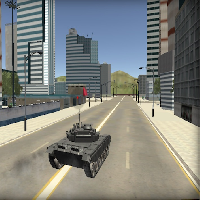
CARS THIEF TANK EDITION















SIMILAR GAMES
































Description


Cars Thief Tank Edition - Unblocked Games at School
About Cars Thief Tank Edition - Unblocked Games at School
Cars Thief Tank Edition offers an immersive experience that blends high speed driving with tactical combat in a blocky environment. Players assume the role of a daring thief who commandeers heavily armed tanks to infiltrate secure zones, steal valuable cargo, and escape before security forces converge. The unblocked version hosted on the UBG at School platform ensures that school computers can run the game without restrictions, allowing students to enjoy brief sessions during breaks while maintaining a safe and appropriate environment.
The game features multiple levels, each designed with distinct layouts, hidden pathways, and escalating challenges. As the player progresses, they encounter diverse enemy types, including armed guards, drone patrols, and rival AI drivers. Success depends on mastering vehicle handling, upgrading weaponry, and exploiting environmental assets such as ramps, tunnels, and cover points. The combination of vehicular chaos and strategic planning creates a dynamic gameplay loop that keeps participants engaged for extended periods.
Key Features of Cars Thief Tank Edition
- Diverse Tank Arsenal: Choose from several tank models, each offering unique speed, armor, and firepower characteristics.
- Customizable Upgrades: Earn in‑game currency to enhance engine performance, bullet capacity, and defensive shields.
- Multiplayer Interaction: Compete or collaborate with classmates in real time, sharing strategies and coordinating attacks.
- Hidden Collectibles: Discover secret items scattered throughout maps to unlock bonus levels and special skins.
- Responsive Controls: Optimized for keyboard and mouse, providing precise maneuverability even on low‑spec devices.
Strategic Tips for New Players
Beginning players benefit from understanding the basic flow of each mission. Follow these steps to improve performance:
- Scout the Area: Before engaging enemy units, use the map view to identify safe routes and potential hiding spots.
- Select the Right Tank: Match the tank’s capabilities with the mission objective; faster tanks excel at quick getaways, while heavily armored units tolerate confrontations.
- Utilize Cover: Position the vehicle behind walls or obstacles to reduce exposure to incoming fire.
- Manage Ammo Efficiently: Reload during brief pauses to avoid being caught without ammunition during critical moments.
- Coordinate with Peers: Form teams to divide responsibilities, such as one player handling distraction while another secures the target.
Advanced Techniques
Experienced players often employ advanced tactics to dominate the leaderboard. Consider the following approaches:
- Ramp Jumping: Use elevated ramps to gain momentum, allowing the tank to traverse large gaps and surprise opponents from unexpected angles.
- Environmental Manipulation: Trigger traps or activate switches to open shortcuts or block enemy pathways.
- Stealth Approaches: Move at reduced speed and avoid unnecessary battles to conserve resources for later stages.
- Rapid Fire Patterns: Alternate between short bursts and sustained fire to maintain pressure while minimizing recoil effects.
How to Access Cars Thief Tank Edition on School Computers
The unblocked version is hosted directly on the UBG at School site. To begin playing, simply navigate to the platform and locate the game icon. The following steps outline the process:
- Open a web browser on the school computer.
- Enter the address UBG at School in the address bar.
- Locate the section labeled “Games” and click on the entry for “Cars Thief Tank Edition”.
- Wait for the loading screen to finish, then select “Play” to start the adventure.
Because the game runs in a browser, no installation is required, and progress is saved automatically to the user’s session. This accessibility makes it possible for students to enjoy short bursts of gameplay between classes without jeopardizing system integrity.
Why Cars Thief Tank Edition Stands Out Among School‑Approved Games
Several factors contribute to the game’s popularity within educational settings:
- Engaging Narrative: The storyline of a daring thief operating in a futuristic city adds depth beyond simple arcade action.
- Balanced Difficulty: Levels scale in challenge, offering a sense of accomplishment for both novice and veteran players.
- Community Interaction: Leaderboards and achievement systems encourage friendly competition, fostering a healthy gaming culture.
- Educational Value: Quick decision‑making, spatial awareness, and cooperative play develop cognitive skills that complement classroom learning.
Future Updates and Roadmap
The development team behind Cars Thief Tank Edition plans to introduce new content that expands the existing framework. Anticipated additions include:
- New Tank Classes: Introducing specialized vehicles with unique abilities such as cloaking or area‑wide damage.
- Expanded Maps: Adding larger environments with varied terrain to provide fresh strategic opportunities.
- Multiplayer Tournaments: Scheduled events that pit teams against each other for exclusive rewards.
- Customizable Skins: Allowing players to personalize their tanks with vibrant designs and emblems.
Staying informed about these updates ensures that participants can anticipate new challenges and maintain enthusiasm for the game over the long term.
Conclusion
Cars Thief Tank Edition represents a compelling blend of action, strategy, and accessibility that resonates with students seeking interactive entertainment during school hours. By leveraging the robust infrastructure of UBG at School, the game delivers a seamless experience that respects institutional policies while providing hours of engaging gameplay. Whether players aim to master tactical combat, compete for high scores, or simply enjoy a brief escape, the title offers a well‑rounded experience that continues to evolve with each update. Embrace the adventure, refine your tactics, and discover why this unblocked gem has captured the imagination of the school community.
Play Cars Thief Tank Edition for free on Unblocked Games at School,
Discover a platform packed with thousands of top-tier games, completely ad-free and simple to enjoy from any location. Get ready for endless fun with our unblocked games—play using your keyboard or just a click!
How to Play Unblocked Games on ubgatschool.gitlab.io
Steps to Play
Playing unblocked games on ubgatschool.gitlab.io is straightforward and designed for quick access, especially in environments like schools where gaming sites might be restricted. Follow these steps to get started:
- Access the Website: Open a web browser (Chrome, Firefox, or Edge work well) and navigate to ubgatschool.gitlab.io. The site is optimized for instant play, so no downloads or installations are needed.
- Browse the Game Library: Once on the homepage, you’ll see a collection of games across various genres like action, adventure, puzzle, sports, or strategy. Scroll through or use any available search or category filters to find a game that interests you.
- Select a Game: Click on a game’s icon or title. The site is designed to load games directly in your browser, often in fullscreen mode for an immersive experience.
- Start Playing: Most games launch immediately without additional setup. Some may have a brief loading screen. If a game offers customizable settings (like graphics or sound), adjust them before starting for the best experience.
- Bypass Restrictions (if needed): If the site is blocked on a school network, try accessing it via a different device or network. Some users report success by using .io or GitLab links, as these are less likely to be flagged by filters.
- Enjoy Ad-Free Gaming: The platform aims to provide an uninterrupted experience, so you can focus on gameplay without pop-ups or ads.
Game Controls
Controls vary by game genre, but below are common setups for popular types of games you’re likely to find on ubgatschool.gitlab.io. Check individual game instructions for specific details, as some titles may use unique configurations.
Action/Platformer Games (e.g., Stickman games, Retro Bowl)
- Arrow Keys or WASD: Move character left, right, up, or jump.
- Spacebar: Attack, shoot, or perform special actions.
- Shift: Sprint or dodge (in some games).
- Mouse Click: Aim or interact with objects (if applicable).
Puzzle/Strategy Games (e.g., 2048, Geometry Dash)
- Arrow Keys: Navigate tiles, pieces, or menus.
- Mouse Click/Drag: Select or move items (common in match-3 or building games).
- Spacebar: Pause or confirm selections.
- Enter: Start or restart the game.
Sports/Racing Games (e.g., Slope Game)
- Arrow Keys or WASD: Steer vehicle or control player movement.
- Spacebar: Accelerate or jump.
- Shift: Brake or boost (in racing titles).
- Mouse: Adjust camera angle or aim (in some sports games).
Multiplayer/Arcade Games (e.g., Slither.io)
- Mouse: Guide character or cursor (especially in .io-style games).
- Left Click: Boost speed or activate abilities.
- Arrow Keys: Alternative movement controls in some titles.
- Spacebar: Pause or trigger special moves.
Tips for Smooth Gameplay
- Check Game Instructions: Many games include a tutorial or control guide on the start screen.
- Adjust Settings: If a game feels laggy, lower graphics settings (if available) to match your device’s capabilities.
- Stay Responsive: Some games, especially action titles, rely on quick reactions, so ensure your keyboard or mouse is functioning well.
- Bookmark the Site: Save ubgatschool.gitlab.io for easy access during breaks.
This setup should help you dive into gaming on ubgatschool.gitlab.io with ease. If you add specific games or control schemes later, consider including a “Controls” section on each game’s page for clarity. Enjoy gaming!
How to Play Unblocked Games on ubgatschool.gitlab.io
Steps to Play
Playing unblocked games on ubgatschool.gitlab.io is straightforward and designed for quick access, especially in environments like schools where gaming sites might be restricted. Follow these steps to get started:
- Access the Website: Open a web browser (Chrome, Firefox, or Edge work well) and navigate to ubgatschool.gitlab.io. The site is optimized for instant play, so no downloads or installations are needed.
- Browse the Game Library: Once on the homepage, you’ll see a collection of games across various genres like action, adventure, puzzle, sports, or strategy. Scroll through or use any available search or category filters to find a game that interests you.
- Select a Game: Click on a game’s icon or title. The site is designed to load games directly in your browser, often in fullscreen mode for an immersive experience.
- Start Playing: Most games launch immediately without additional setup. Some may have a brief loading screen. If a game offers customizable settings (like graphics or sound), adjust them before starting for the best experience.
- Bypass Restrictions (if needed): If the site is blocked on a school network, try accessing it via a different device or network. Some users report success by using .io or GitLab links, as these are less likely to be flagged by filters.
- Enjoy Ad-Free Gaming: The platform aims to provide an uninterrupted experience, so you can focus on gameplay without pop-ups or ads.
Game Controls
Controls vary by game genre, but below are common setups for popular types of games you’re likely to find on ubgatschool.gitlab.io. Check individual game instructions for specific details, as some titles may use unique configurations.
Action/Platformer Games (e.g., Stickman games, Retro Bowl)
- Arrow Keys or WASD: Move character left, right, up, or jump.
- Spacebar: Attack, shoot, or perform special actions.
- Shift: Sprint or dodge (in some games).
- Mouse Click: Aim or interact with objects (if applicable).
Puzzle/Strategy Games (e.g., 2048, Geometry Dash)
- Arrow Keys: Navigate tiles, pieces, or menus.
- Mouse Click/Drag: Select or move items (common in match-3 or building games).
- Spacebar: Pause or confirm selections.
- Enter: Start or restart the game.
Sports/Racing Games (e.g., Slope Game)
- Arrow Keys or WASD: Steer vehicle or control player movement.
- Spacebar: Accelerate or jump.
- Shift: Brake or boost (in racing titles).
- Mouse: Adjust camera angle or aim (in some sports games).
Multiplayer/Arcade Games (e.g., Slither.io)
- Mouse: Guide character or cursor (especially in .io-style games).
- Left Click: Boost speed or activate abilities.
- Arrow Keys: Alternative movement controls in some titles.
- Spacebar: Pause or trigger special moves.
Tips for Smooth Gameplay
- Check Game Instructions: Many games include a tutorial or control guide on the start screen.
- Adjust Settings: If a game feels laggy, lower graphics settings (if available) to match your device’s capabilities.
- Stay Responsive: Some games, especially action titles, rely on quick reactions, so ensure your keyboard or mouse is functioning well.
- Bookmark the Site: Save ubgatschool.gitlab.io for easy access during breaks.
This setup should help you dive into gaming on ubgatschool.gitlab.io with ease. If you add specific games or control schemes later, consider including a “Controls” section on each game’s page for clarity. Enjoy gaming!